G♯+9(add13)G♯ Augmented 9th Added 13th
ERoot
G♯tone
Ctone
Dtone
F♯tone
C♯tone
Formula ♭6 · 1 · 3 · ♭5 · ♭7 · 4 · Notes E · G♯ · C · D · F♯ · C♯
How to play it
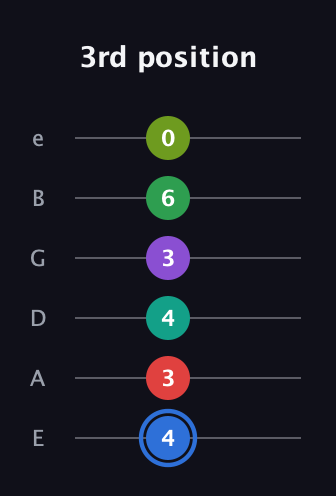
G♯+9(add13) fingering positions
Standard Tuning (EADGBE), low E on the left. Each dot is colour-coded by note — the ringed dot is the root. Numbers below show the fret per string (x = muted).


Read it as tab
G♯+9(add13) guitar tab
The same voicings in tablature — high e on top, low E on the bottom. Each fret number is colour-coded by note; the ringed number is the root, × means don’t play that string.



Sound
How G♯+9(add13) sounds
Consonance
1/ 5
Brightness
DarkBright
Character
Moods & genres
Moods
saturatedcolorful
Genres
jazz
Theory
Notes & relationships
NotesE · G♯ · C · D · F♯ · C♯
Formula (scale degrees)♭6 · 1 · 3 · ♭5 · ♭7 · 4
Explore
More ways to play G♯ Augmented 9th Added 13th
Browse the rest of the G♯ chords in this tuning, or open G♯+9(add13) in the app for every voicing.
G♯+9(add13) in other tunings:

See & hear G♯+9(add13) in Chordology
The app shows every voicing across guitar, piano, bass, banjo and ukulele — in any tuning, with a capo, and you can play every chord back. All offline.
Hear every chordMore voicingsEvery tuning & capoWorks offline